 GitBucket
|
|
|||
|---|---|---|---|
| .github/ ISSUE_TEMPLATE | 5 months ago | ||
| configs | 5 months ago | ||
| docs | 5 months ago | ||
| envoy | 5 months ago | ||
| scripts | 5 months ago | ||
| CHANGELOG.md | 5 months ago | ||
| LICENSE | 5 months ago | ||
| README.md | 5 months ago | ||
| docker-compose.yml | 5 months ago | ||
Aegis
Self-hosted Envoy gateway with AI threat analysis, TLS automation, and a real-time security dashboard.



Aegis sits between the internet and your services. It controls Envoy Proxy via xDS, watches all traffic in real time, blocks malicious IPs automatically, manages TLS certificates, and lets you chat with your gateway through an AI assistant — all in a single Docker container.
Quick start
1. Download the starter files
Create a directory and download the required files:
mkdir aegis && cd aegis

# Download docker-compose config
curl -O https://raw.githubusercontent.com/axieyangb/aegis/main/docker-compose.yml

# Download Envoy static bootstrap config
mkdir envoy
curl -o envoy/envoy.yaml https://raw.githubusercontent.com/axieyangb/aegis/main/envoy/envoy.yaml

# Download baseline database configuration (for real production users)
mkdir configs
curl -o configs/starter.json https://raw.githubusercontent.com/axieyangb/aegis/main/configs/starter.json
2. Start the gateway
docker compose up -d
- Open
http://localhost:8765— default login:admin/changeme(ChangeADMIN_PASSWORDindocker-compose.yml, or change it in Settings → Auth after logging in!).
3. Import the baseline configuration
- Go to the Gateway page in the dashboard.
- Click the Import button at the top right.
- Upload the
configs/starter.jsonfile you downloaded. - You should see the
http_listenerandhttps_listenerappear, and the xDS sync status turn green!
Simulating Traffic & Live Demo
If you are running Aegis locally without real traffic, you can use our built-in Traffic Demo Generator script. We provide a pre-configured configs/demo.json database baseline that has the PROXY Protocol enabled out-of-the-box so you can run the demo with zero manual setup!
1. Start the Gateway & Import Demo Configuration
- Ensure your containers are running (
docker compose up -d). - Open the Aegis Dashboard (
http://localhost:8765). - Go to the Gateway page, click the Import button (top right), and upload
configs/demo.json(instead ofstarter.json).- (Optional: If you downloaded the quick-start files via curl, you can download the demo config using:
curl -o configs/demo.json https://raw.githubusercontent.com/axieyangb/aegis/main/configs/demo.json) - This automatically configures Envoy's HTTP listener to accept spoofed client IPs via PROXY Protocol.
- (Optional: If you downloaded the quick-start files via curl, you can download the demo config using:
2. Run the Generator
From the repository root, run the self-contained Python script:
python3 scripts/demo_generator.py
3. Watch the Dashboard Live!
Open your dashboard and watch:
- World Traffic Map: populating with requests flowing in from USA, Japan, Germany, Brazil, and Australia.
- Charts: Device breakdowns, User-Agents, and HTTP Status codes filling up dynamically.
- Scanner Bot: A simulated bot crawler probing admin endpoints (like
/wp-adminor/.env), raising the anomaly charts. - AI Auto-Blocking in Action: An attacker (
99.99.99.99) will launch a SQL injection attack. You will see Aegis's AI engine detect it, trigger an alert, and push a dynamic xDS block rule to Envoy. Instantly, all subsequent requests from99.99.99.99will start failing (dropped connections) on the dashboard!
👉 For a detailed breakdown of how the generator simulates traffic and auto-blocking under the hood, see the Traffic Generator Guide.
Features in Action
Live Traffic Dashboard
 Real-time request feed, top-IP leaderboard, world traffic map, and live blocking activity — all in one view.
Owl AI Assistant
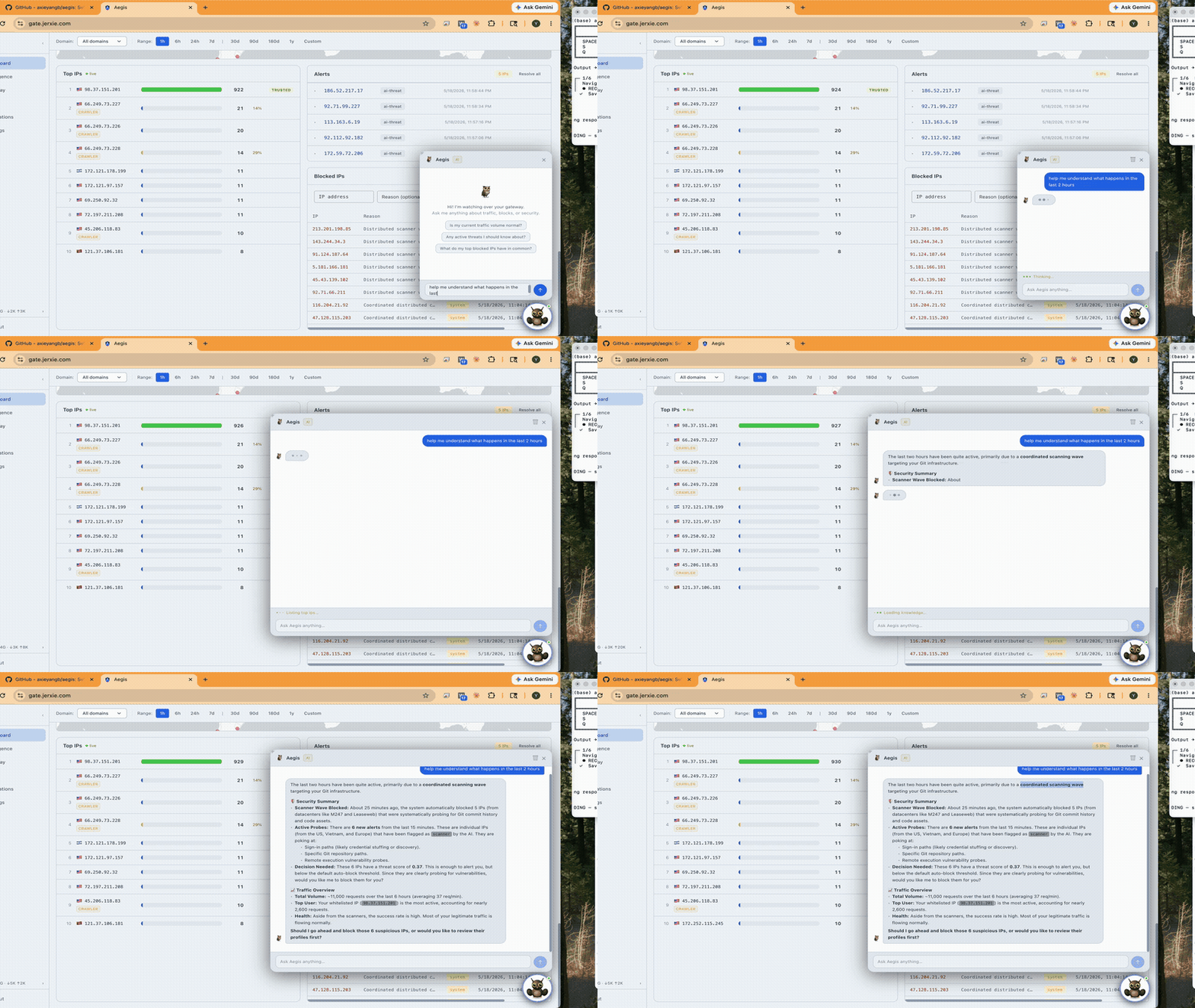 Ask your gateway anything in plain English. Owl analyses current traffic, surfaces threats, and recommends exactly what to tighten — no dashboards to dig through.
IP Intelligence
 Every IP automatically profiled: geolocation, ASN, VPN/Tor detection, AbuseIPDB reputation score, and full request history. Click any IP to deep-dive, then ask Owl to triage it in context.
Gateway Control Plane
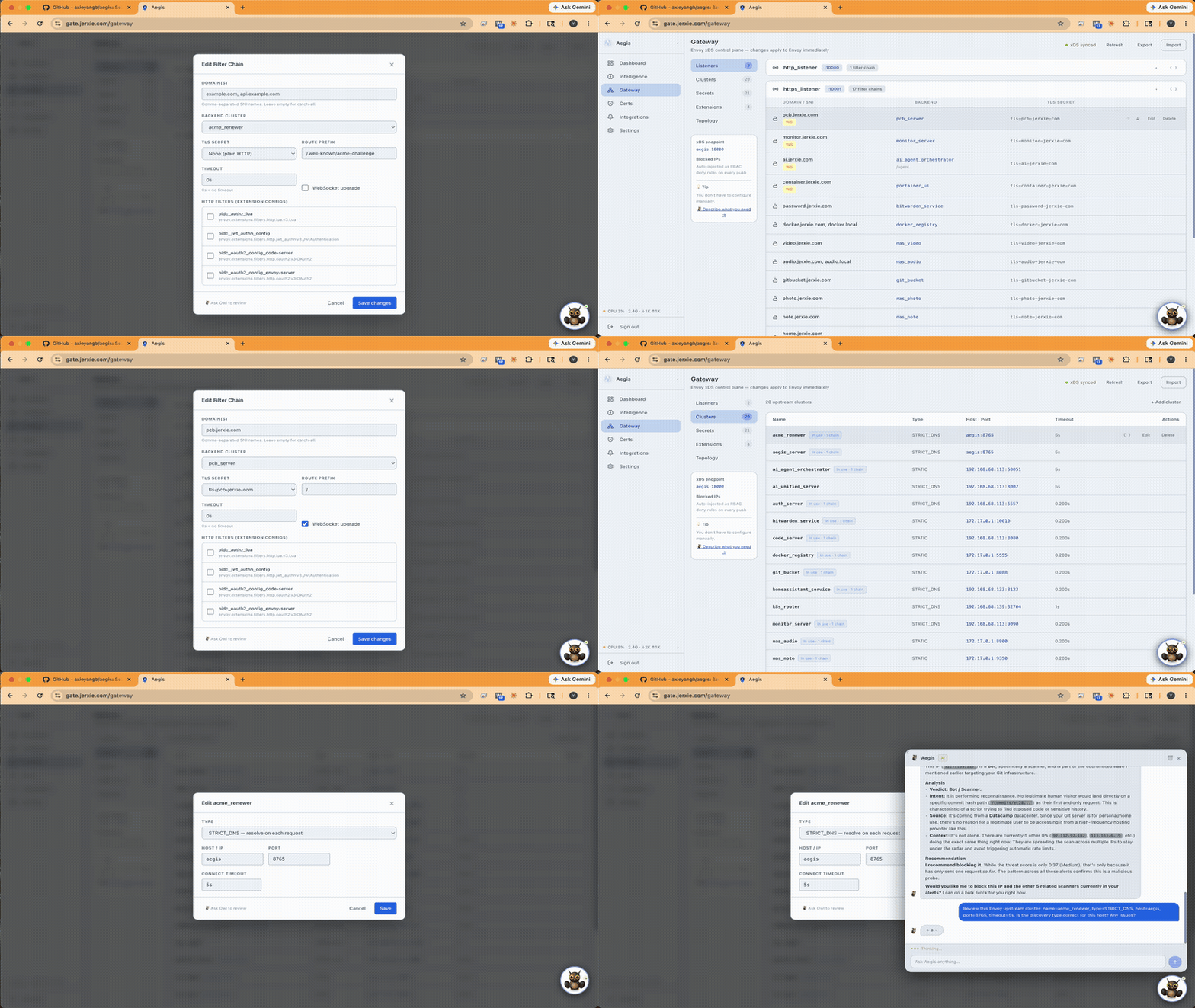 Full Envoy xDS control — live topology view, listeners, filter chains, clusters, and extensions. See exactly which clusters are in use and by how many chains. No YAML editing required.
TLS Certificate Automation
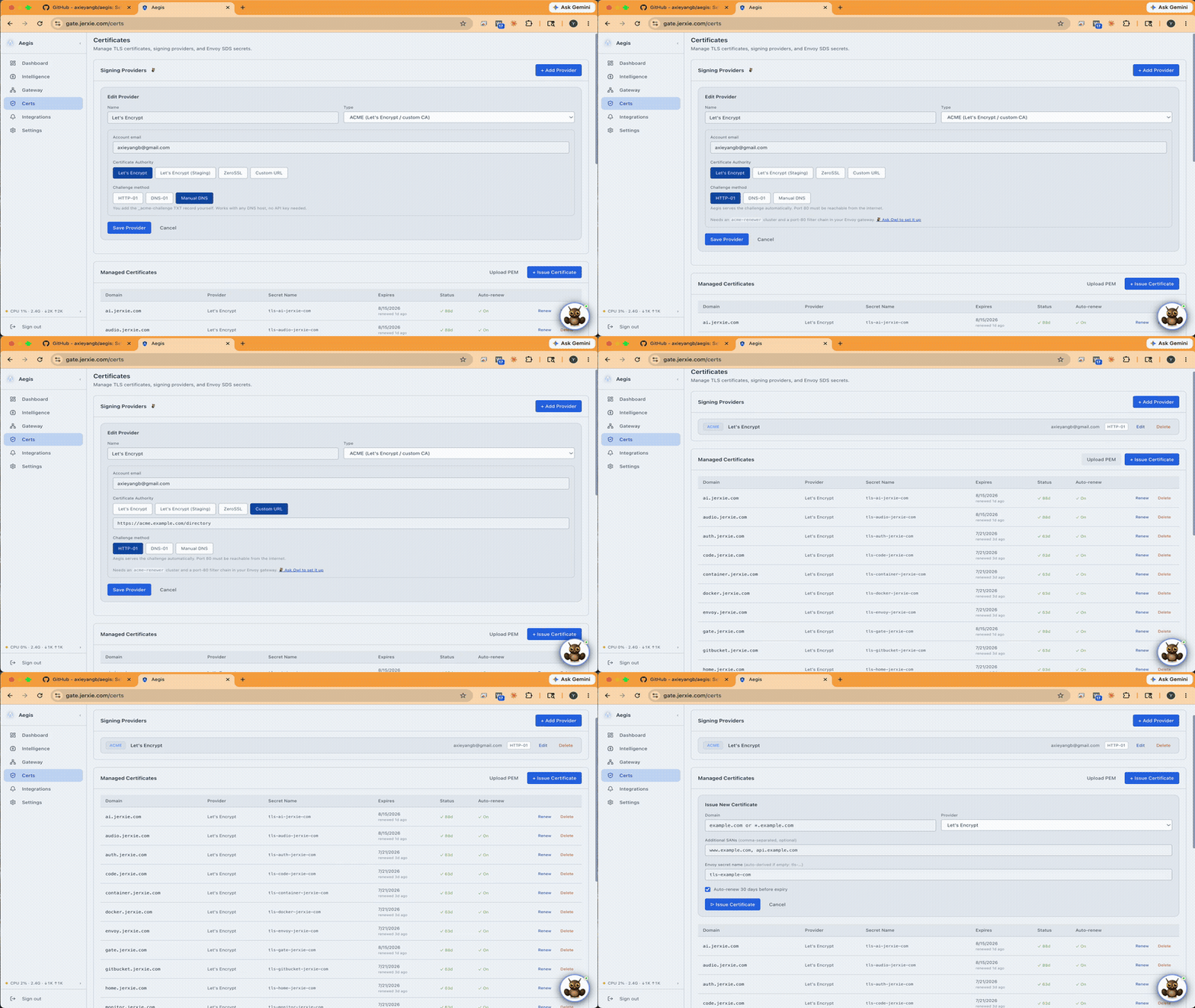 ACME auto-renewal via Let's Encrypt or ZeroSSL, delivered straight to Envoy SDS. Stuck on HTTP-01 prerequisites? Ask Owl to walk you through it step by step.
AI Patrol Sweeps
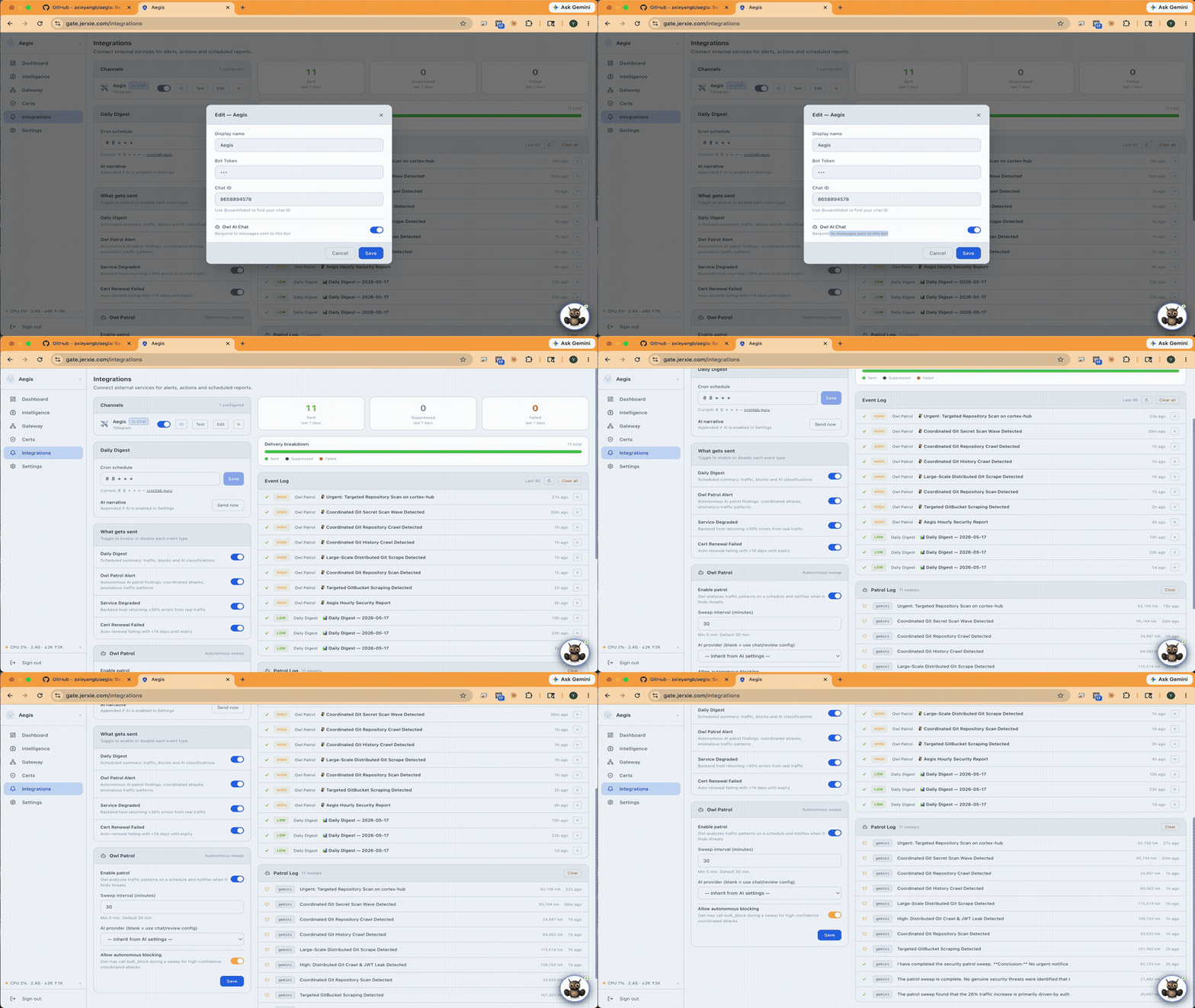 Scheduled AI sweeps monitor your traffic around the clock. Threats get triaged automatically and pushed to your notification channels — Telegram, Discord, Slack, or webhook.
Mobile: Owl on the Go
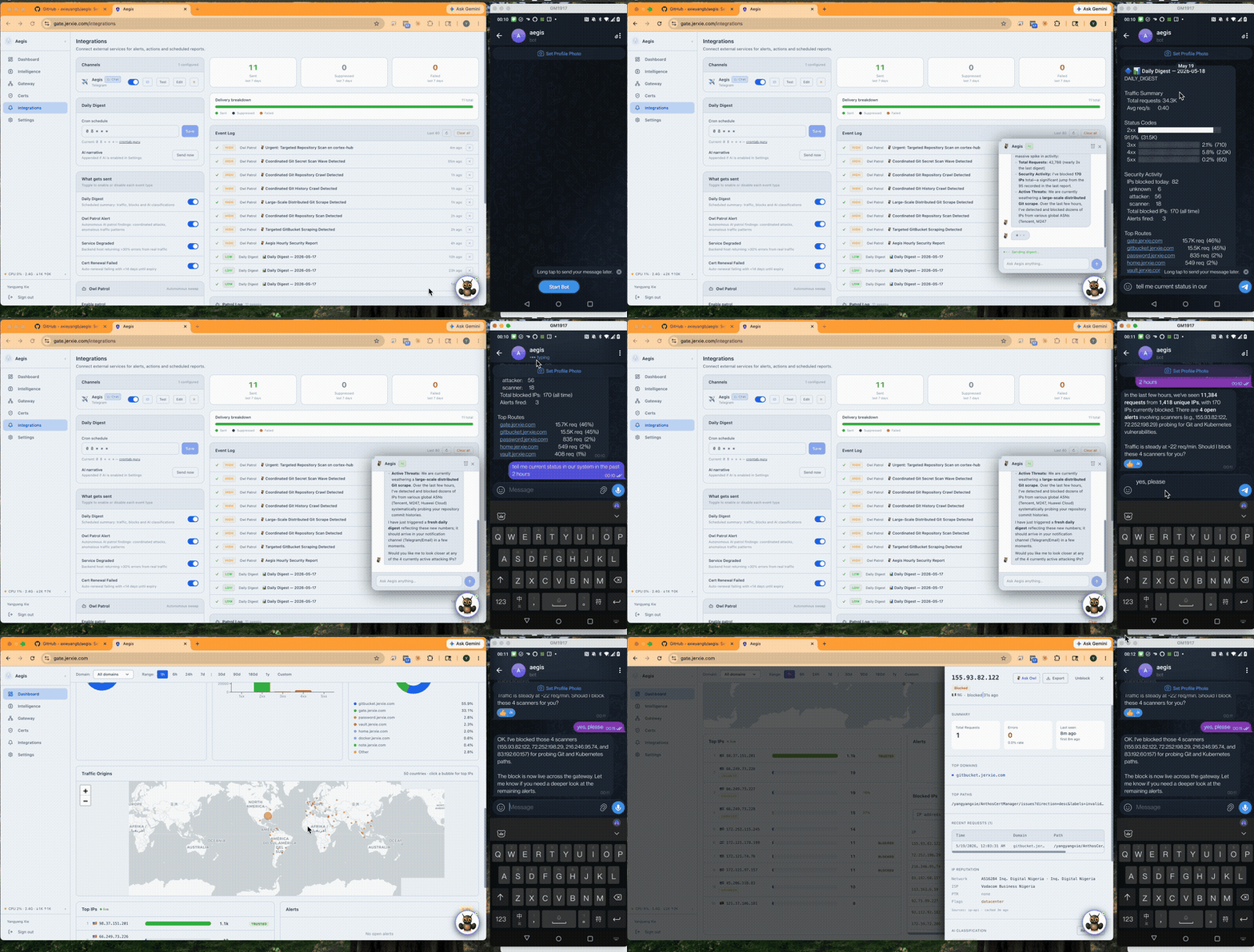 Open the dashboard on your phone, ask Owl what happened in the last two hours, and watch it triage the threats, block the bad IPs, and confirm the blocks — all from a single chat.
Features
| Feature | Description | |
|---|---|---|
| 🛡 | Envoy xDS Control Plane | Visual editor for listeners, clusters, filter chains — pushed live via gRPC |
| 📊 | Real-time Analytics | Live request feed, top IPs, world map, device + status breakdown |
| 🤖 | AI Threat Analysis | Background IP classification using Gemini / Claude / GPT / Ollama. Auto-blocks attackers |
| 🦉 | Owl AI Assistant | Chat with your gateway — ask about traffic, threats, config, anything |
| 🔒 | TLS Automation | ACME (Let's Encrypt, ZeroSSL), HTTP-01 & DNS-01 challenges, auto-renewal via Envoy SDS |
| 🔔 | Notifications | Telegram, Discord, Slack webhooks — alert on blocks, anomalies, daily digest |
| 🌍 | Geo Analytics | Country-level traffic breakdown, remote or local MaxMind GeoIP |
| 🔑 | Auth & SSO | Built-in login + optional OIDC/SSO (Google, Authentik, Keycloak, etc.) |
| 🔍 | IP Intelligence | Per-IP profiles with ASN, ISP, VPN/Tor detection, AbuseIPDB reputation |
| 📱 | Mobile-ready | Full dashboard + Owl chat from any device — no native app required |
Architecture
Internet ──▶ Envoy Proxy ──▶ Your services
                  │
          gRPC xDS (port 18000)
                  │
             ┌────▼─────┐
             │  Aegis   │  port 8765
             │          │
             │ xDS CP   │  controls Envoy live
             │ Analytics│  reads Envoy ALS logs
             │ AI Engine│  classifies IPs
             │ Cert Mgr │  ACME → Envoy SDS
             │ Dashboard│  web UI + REST API
             └──────────┘
Deployment Options (Exposing Envoy)
Depending on your network environment, Aegis supports three main deployment architectures to expose Envoy to the public internet:
- Direct Exposure (Port Forwarding): Best for environments with a static public IP. WAN ports
80/443are forwarded directly from your home router to the host. - VPS Relay Tunnel (PROXY Protocol): Recommended for home labs, CGNAT, or privacy. Hides your home IP by tunneling traffic from a public VPS to Envoy, using the PROXY Protocol to safely preserve client IPs.
- Cloudflare Tunnel (HTTP Headers): Best for zero-port-forwarding setups behind Cloudflare. Preserves client IPs by extracting custom Cloudflare HTTP headers.
👉 See the full Deployment Architectures Guide for detailed diagrams, configuration, and setup instructions.
Configuration
Environment variables
| Variable | Default | Description |
|---|---|---|
PORT |
8765 |
Dashboard + API port |
XDS_PORT |
18000 |
Envoy gRPC xDS port |
DATA_DIR |
/data |
Persistent data directory |
ADMIN_USERNAME |
admin |
Admin username |
ADMIN_PASSWORD |
aegis |
Admin password — change this |
AUTH_ENABLED |
true |
Require login. Set to false to bypass authentication (anonymous mode) |
BLOCK_ENABLED |
true |
Enable auto IP blocking |
NODE_ID |
home |
Envoy node ID (must match envoy.yaml) |
Data volume
Mount a volume or directory to /data:
/data/
├── aegis.db        ← SQLite (traffic, certs, config, alerts)
└── skills/         ← Optional: override Owl AI knowledge files
    └── site.md     ← Custom context injected into Owl's system prompt
Docs
- Getting started
- Deployment Architectures (Exposing Envoy)
- Sequence Diagrams (Flow References)
- Envoy configuration
Multi-arch
linux/amd64 and linux/arm64 — runs on x86 servers, Raspberry Pi, Synology NAS, and Apple Silicon.
# Pin a specific version
docker pull axieyangb/aegis:v1.0.0

# Always latest
docker pull axieyangb/aegis:latest
License
Aegis is distributed as a compiled binary. Source code is proprietary. See LICENSE.
Community tier is free forever. A Pro license unlocks unlimited notification channels, longer log retention, and unlimited AI patrol sweeps.
About the Author
Aegis is designed and built by Jerry Xie — formerly a network security engineer at Palo Alto Networks, now a Senior Software Engineer specialising in identity, distributed cloud, Kubernetes, networking, and AI.
Outside of work: smart home automation, DIY racing drones, home lab tinkering, 3D printing, CNC machining, PCB design, and robotics. Aegis started as a home lab project and grew into a product.
Support & Enterprise
- Issues & feature requests: GitHub Issues
- Enterprise collaboration, custom integrations, or just want to know more: yyangxie@gmail.com